SQL Schema Backup
Back up the entire schema of any SQL Server database.
No data, all schema, all in one place
Simple console application that you can use to backup an entire SQL Server database schema in one quick step.
- Tables
- Indexes
- Views
- Users
- Security
- Functions
- ...and everything else that makes up the database
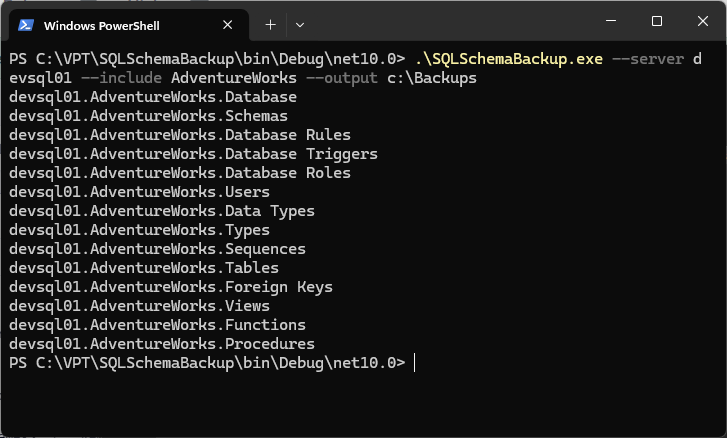
Usage
SQLSchemaBackup --server <names> --output <folder> [options]
| Option | Description |
|---|---|
-s, --server <names> |
Required. Servers to back up. Comma separated and/or repeated. |
-o, --output <folder> |
Required. Folder to write the scripts to. |
-i, --include <patterns> |
Only back up databases matching these names. * wildcards allowed. |
-x, --exclude <patterns> |
Skip databases matching these names. * wildcards allowed. |
-p, --parallel <n> |
Servers to back up at the same time (default 4). |
-l, --login <name> |
Connect with this SQL Server login instead of Windows authentication (the current Windows account). |
--password <text> |
Password for --login. Prefer the SQLSCHEMABACKUP_PASSWORD environment variable, or omit it to be prompted. |
-q, --quiet |
Only report errors. |
-v, --version |
Show the version. |
-h, --help |
Show help. |
Values can be given as --output D:\Schemas or --output=D:\Schemas. Option names are not case sensitive.
Examples
SQLSchemaBackup -s SQL01 -o D:\Schemas
SQLSchemaBackup -s SQL01,SQL02\REPORTING -o D:\Schemas -x master,model,msdb,tempdb
SQLSchemaBackup -s SQL01 -o D:\Schemas -i Sales* -p 8 -q
Output
Each database is written to <output>\<server>\<database>\ as numbered .sql files (Database, Schemas, Roles, Users, Types, Tables, Foreign Keys, Views, Functions, Procedures), each batch followed by GO. Tables, views, functions and procedures are ordered by dependency, and files from a previous run are replaced.
Exit codes
| Code | Meaning |
|---|---|
| 0 | Success |
| 1 | One or more errors while scripting (details are written to stderr) |
| 2 | Invalid usage |
Upgrading from earlier versions
The old /Servers:, /Folder:, /Include:, /Exclude: and /Threads: switches still work so existing scheduled tasks keep running, but they are deprecated; /Threads: is now --parallel, /Folder: is --output and /Servers: is --server.
/User: and /Password: (Windows impersonation) were removed. To connect as a different Windows account, run the tool as that account (for example runas or a scheduled task identity); to use a SQL Server login, use --login.
Download
What's new in v1.0.0
New 🎉
- Initial public release.
Changed 😎
- n/a
Fixed 🐛
- n/a