Cost threshold for parallelism and MAXDOP
There are a lot of "most overlooked" configuration settings in SQL Server, but I'm going to cover these two alone since they are quite closely related: Cost Threshold for Parallelism and Max Degree of Parallelism.
What's all this about?
First let's discuss Degree of Parallelism in its most simple form. When given a task to complete, SQL Server has a lot of choices to make about how to get the work done. One of the most important parts of that plan-of-attack is whether to do all the work sequentially or to split the task into multiple smaller tasks and have the smaller tasks done all at once by different CPUs.
Gather Performance Metrics!
If you are here then it's likely that you are dealing with some kind of performance issue or vague resource contention. If so, then you'll need deep insight into these systems, which is why we developed the Vroom Performance Suite. So before we move forward (or maybe after the article), give the Vroom Performance Suite a try and put the days of poor performance behind you.
Download the Vroom Performance Suite
Back on Topic
Parallelism is easily one of the coolest things to happen in computer science, but overuse can be just as detrimental as not enough. For one thing, there are only so many resources on a given server. If there are 4 CPUs and 100 connections then it doesn't make sense for each of those connections to spawn 4 threads each. Imagine the contention! All of the parallel tasks would fight over things like I/O bandwidth, memory, locks and even the pool of worker threads. Another thing is the overhead. Generating a parallel plan is not a trivial task, and it takes time to set up all of the required threads, wait on their completion and piece all of the results from the smaller units of work back together.
How can we control this potential storm of threads?
Max Degree of Parallelism
That's where Cost Threshold for Parallelism and Max Degree of Parallelism save the day!
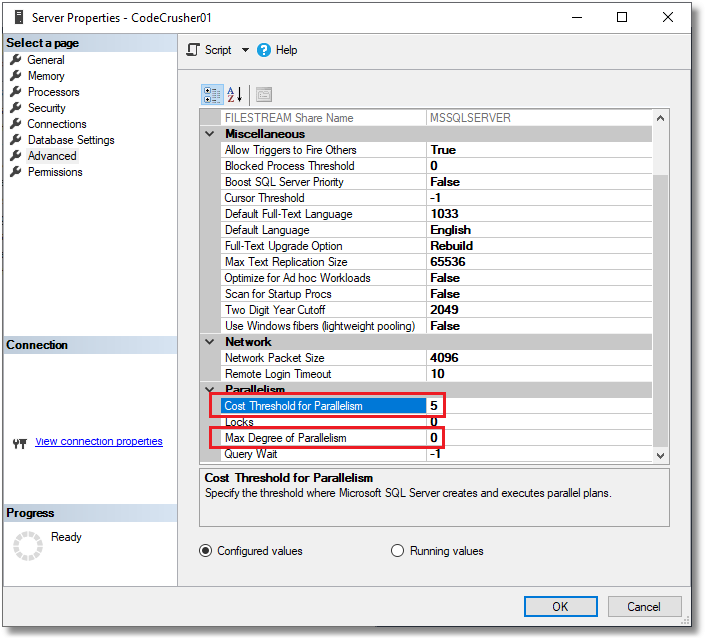
Max Degree of Parallelism is basically the maximum number of CPUs that SQL Server will be allowed to use for a single parallel operation within a query. MAXDOP=1 means no parallel plans at all (everything runs on a single CPU), MAXDOP=4 means that each parallel step can be spread across up to 4 CPUs, and the scariest setting of all (which happens to be the SQL Server default!!) is MAXDOP=0, which means that SQL Server can, at its discretion, use every available CPU (up to 64) for each parallel step, which to me is just nonsense. (Be aware that a complex plan can contain several parallel branches, each with its own set of threads, so one query can use more threads than the MAXDOP value.)
Cost Threshold for Parallelism
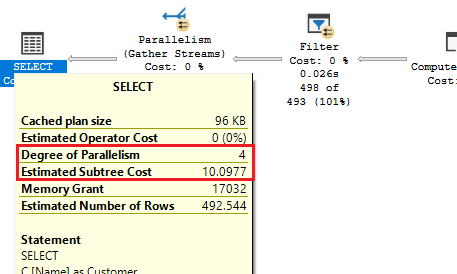
Next, we need to figure out how to prevent SQL Server from generating parallel plans for rather trivial queries. That's where Cost Threshold for Parallelism comes in. For those of you familiar with SQL Server execution plans, you'll recognize the sub-tree costs. This is basically a proprietary, unitless estimate of how many resources a SQL statement will consume, or how "heavy" a statement is or will be. The setting for Cost Threshold for Parallelism tells how high the estimated cost of a serial plan must be before a parallel plan will even be considered. (Considered is the key word: the optimizer still picks whichever plan it estimates to be cheaper.) The default value for this most crucial setting is a mere 5.
Putting it all together
When you combine the lunacy of an unlimited degree of parallelism with the rock-bottom low parallel plan creation threshold of 5, you will have problems. Under load these problems will crop up in the form of high CPU usage, slow query response times, lock contention, higher than normal deadlocks, parallelism waits (CXPACKET and CXCONSUMER), worker thread starvation, etc.
There are a lot of opinions in the world of SQL Server performance tuning, but luckily for you there is a pretty solid consensus that, for OLTP-style workloads at least, these defaults are baaad news. (Data warehouse and reporting workloads with a few big queries are a different story and often benefit from more parallelism.)
What should I set them to?
Max Degree of Parallelism
The proper setting for Max Degree of Parallelism is a bit of an art, which will require some knowledge of your CPU architecture, core count, logical threads (hyper-threading) and NUMA configuration.
- For hyper-threading, the MAXDOP should be set at or below half of the number of available schedulers (that is, around the number of physical cores), which can be obtained via:
SELECT COUNT(0)
FROM sys.dm_os_schedulers
WHERE status = 'VISIBLE ONLINE';
- For non-HT CPUs the number should be set at or below the number of cores available to SQL Server.
- If you have a NUMA configuration then the MAXDOP should be set at or below the number of cores configured for any one NUMA node. NUMA is a memory design which allows a CPU to use "its own" memory faster than the generally available pool of memory in non-NUMA architectures.
- Whatever your hardware, Microsoft's general guidance is to not go above 8, since the cost of coordinating more threads usually outweighs the benefit. Cost Threshold for Parallelism
While your mileage may vary, the recommendation for Cost Threshold for Parallelism is between 25 and 50 as a starting point, which you can then tune by looking at the costs of the queries in your own workload. I've seen it as high as 100 and as low as 10…. but 5 is just crazy unless you have all the horsepower in the world and you are the only connection to the server.
How to change them
Both settings are advanced options, and they take effect as soon as you run RECONFIGURE (no restart required):
EXEC sp_configure 'show advanced options', 1;
RECONFIGURE;

EXEC sp_configure 'max degree of parallelism', 8;
EXEC sp_configure 'cost threshold for parallelism', 50;
RECONFIGURE;
You can also override MAXDOP for an individual query with the OPTION (MAXDOP n) hint, or per database with ALTER DATABASE SCOPED CONFIGURATION SET MAXDOP = n; (SQL Server 2016 and later).