Nuances of the Microsoft Windows UAC
Nuances of Microsoft Windows UAC/LUA and Its Effects on Performance Monitoring
UAC (User Account Control) and LUA (the EnableLUA setting that turns on UAC's "Admin Approval Mode") have an effect on the way that privileged tools such as the Vroom Performance Suite (VPS) implement account impersonation. Let's demystify what can sometimes seem like a daunting problem of access control and escalation.
The confusion starts when an account is unable to be used for impersonation because it has too many rights, or more specifically Administrators rights. The key to successful impersonation is limiting the account on the VPS server to a regular ol' user account. It can be an administrator of the machine you want it to monitor, but leave it limited on the VPS server!
VPS can monitor many servers, and each of them can be monitored using a different Windows credential. VPS will run a crawler process as each of these credentials using impersonation. The VPS service will launch a separate process for each distinct credential and use it to funnel the performance metrics to the VPS repository database.
...but here's the problem: UAC/LUA really plays no direct role at the Windows service level. While the services which run there have a lot of permissions, they do not SPECIFICALLY have Administrators rights, and a service has no way to "elevate" because there is no interactive user to approve a consent prompt. This means that if you add a scanner credential to VPS that has Administrators rights on the VPS server, Windows will "detect" that a lower-level context is attempting to run a process with higher-level permissions. Elevation is not allowed at this level.
It is therefore important that the accounts you use to monitor remote servers NOT be members of the Administrators group on the VPS server itself. For clarity, the account CAN be an administrator on the server which is being monitored, but not on the server on which VPS is installed.
An alternative to the rule which allows for a bit of flexibility
There is actually a small caveat which works in our favor. If the credential that is configured to monitor a server is the same as the account that is running the VPS services, then it will NOT require impersonation. The VPS services will detect this scenario and will simply run the crawler process as itself. In this way, a local administrator account can be used to monitor the local machine and even remote machines.
What this means is that if you specify an account with administrative permissions when installing VPS, you can then use that credential to monitor any server for which that account has permissions. In this case, that also includes monitoring the local server on which VPS is installed.
Disabling UAC?
No! Don't do that! First and foremost, we have worked very hard to ensure that there are numerous methods to operate VPS across the entire spectrum of security-conscious organizations. That being said, we do not recommend disabling UAC. First of all, because that's not a reasonable security practice, and second, because simply turning down the UAC prompt (for example, moving the slider to "Never notify") will not solve the problem we are discussing here. That setting only changes the prompting behavior, and administrators still run in Admin Approval Mode.
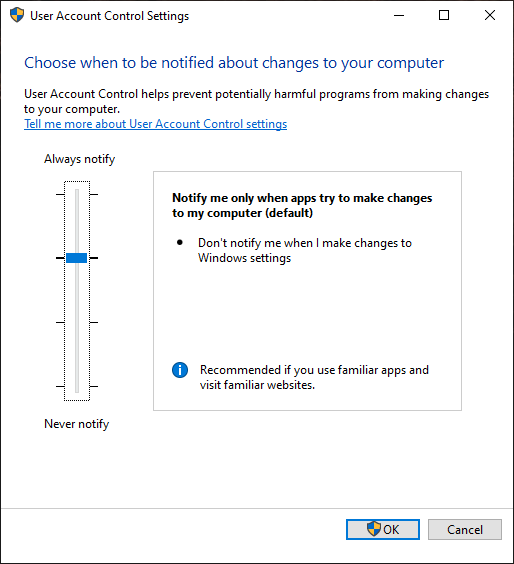
In order to run fully unencumbered, an administrator would need to fully disable LUA (the "Run all administrators in Admin Approval Mode" policy, which requires a reboot), which goes against the recommendations of security experts and the designers of the operating system. Additionally, it has negative feature-related consequences on Windows 10, Windows Server 2019 and later versions.