SQL Workload Generator
SQL Workload Generator puts a realistic, repeatable load on a Microsoft SQL Server.
Features
Realistic, varied load
Random numbers, names and cities from your own sample data make every execution different, so the server sees lifelike traffic.
Safe, controlled ramp
Ramp threads up and down gradually, set run days and hours, and stop cleanly.
Live insight
Watch threads, commands, rows per second, CPU and reads in real time. Run it from the desktop app or unattended from the console.
Screenshots
Download
What's new in v2.0.0
New 🎉
- Dark mode: the app follows the Windows light/dark setting, including the code editors, syntax highlighting, charts and output windows.
- Localization: the UI is translated through NTDLS.Localization. Choose Tools > Language... to switch languages at once, and the choice is remembered. A Localization.bat is included to update the translations.
- $RampDownDelay setting: threads now stop one at a time (last started first). The default of 0 stops them all at once.
- Immediate stop: close the run window a second time (or press a key a second time in the console app) to skip the ramp down and cancel running commands.
- Peak time and run windows can now run past midnight, such as 10PM to 6AM.
- Help > Example Project opens the sample project folder.
- 76 new snippets, organized into folders: People and Places, Dates and Times, Numbers and Identifiers, Variables, Database Lookups, Statements and Workload Headers.
- User guide (USER_GUIDE.md) covering the UI, settings inheritance, functions, variables, asset files with ::DS() and running from the console.
- .vwgp file association, per user and without admin rights.
Changed 😎
- Moved to .NET 10, with the solution converted to .slnx and all dependencies updated.
- Redesigned UI, with the forms reorganized and using NTDLS.WinFormsHelpers theming.
- The installer now installs for the current user without admin rights, and installs no other registry settings.
- Settings are now inherited through every folder level, from Workloads down to the script, with the closest one winning.
- The first thread now starts immediately on ramp up, and $RampUpDelay is applied between threads.
- ::Int(min, max) now includes the maximum.
- Trailing -- comments and indented settings are accepted on setting lines.
- The console app stops gracefully on a key press or Ctrl+C, and exits with a code if the project can't be loaded.
- Drag and drop from the functions explorer now drags text.
Fixed 🐛
- Script variables (::Set / ::Get) were shared by all threads of a workload, so threads overwrote each other's values. Each thread now has its own.
- Several identical functions in one statement (::Int(1, 5) ::Int(1, 5)) all received the same value.
- Data sample text containing $1 or $& was altered.
- ::DS() could never return the last line of an asset, and blank lines in assets could be returned.
- ::Decimal produced a comma decimal separator under some regional settings.
- ::Left, ::Right and ::SubString threw on short text.
- T-SQL such as geography::Point(...) was mistaken for a function.
- A line containing only ::Set left a blank line behind in the SQL.
- Stopping during ramp up could start more threads afterwards, and the stop waited out the ramp-up sleep.
- A workload with a configuration error crashed the app instead of being skipped.
- A failing server was retried in a tight loop. Retries now wait at least a second.
- Rows were counted once per result set instead of once per row, and the record delay was applied once per result set.
- The reported statement duration was overwritten instead of accumulated.
- Statistics could be corrupted when updated from several threads at once.
- Random numbers could break under heavy multithreaded use, because one random generator was shared by all threads.
- A missing Assets folder or a duplicate asset name caused an error when loading a project.
- The $Mode and $IntegratedSecurity templates in the function's explorer lacked their colon.
What it does
SQL Workload Generator puts a realistic, repeatable load on a Microsoft SQL Server. You describe the load as a set of workloads: SQL scripts that say how many threads run them, how often, and when. The SQL can contain functions that change on every execution (random numbers, names and cities from lists of sample data, values read from the database), so the server sees varied, lifelike traffic instead of the same statement repeated.
Typical uses:
- Load and soak testing a new server, database or index design.
- Reproducing a production-like mix of reads and writes (lookups, inserts, batch updates) at different times of day.
- Generating activity so that monitoring, alerting and tuning tools have something to observe.
You work with it in two ways, over the same projects:
- The desktop app (
VSWG.UI.exe) to write, preview and run workloads, with live charts. - The console application (
VSWG.CmdLine.exe) to run a project unattended. See Running from the console.
Use it on servers you are allowed to load. A workload runs real statements, including
INSERT,UPDATEandDELETE, against the server and database you point it at.
Concepts
| Term | Meaning |
|---|---|
| Project | A folder with a .vwgp file, an Assets folder and a Workloads folder. |
| Workload | One .sql file under Workloads: some settings followed by the SQL to run. |
| Thread | A workload runs on one or more threads. Each thread repeats: build the statement, connect, execute, wait. |
| Setting | A line such as $Threads: 4 that controls how a workload runs. |
| Function | A call such as ::Int(1, 100) inside the SQL, replaced with a value each time the script runs. |
| Asset | A text file of sample values (one per line) that ::DS() picks from at random. |
A project looks like this:
MyProject\
    MyProject.vwgp
    Assets\
        Word.txt                 Sample data, one value per line
        USCity.txt
    Workloads\
        @Configuration.txt       Settings shared by every workload
        Orders\
            @Configuration.txt   Settings shared by the workloads in this folder
            Create Order.sql     A workload
            Lookup Order.sql     Another workload
        Reports\
            Monthly Totals.sql
Every .sql file anywhere under Workloads is a workload, and all of them run at the same time when you run the project.
Everything in a .sql file that is not a setting or a function is plain T-SQL and is sent to the server as written. A line that
starts with -- is a comment and is not sent.
The desktop app
Starting
When the app starts, the welcome window offers to open an existing project, open a recent project, or create a new
project. A new project is created with an Assets and a Workloads folder and a default configuration. A sample project
(VroomSimulation) is installed with the program so you can see a working example.
The app follows the Windows light/dark setting (restart it after changing the Windows setting). To change the language, choose Tools > Language...; it applies at once and is remembered.
The main window
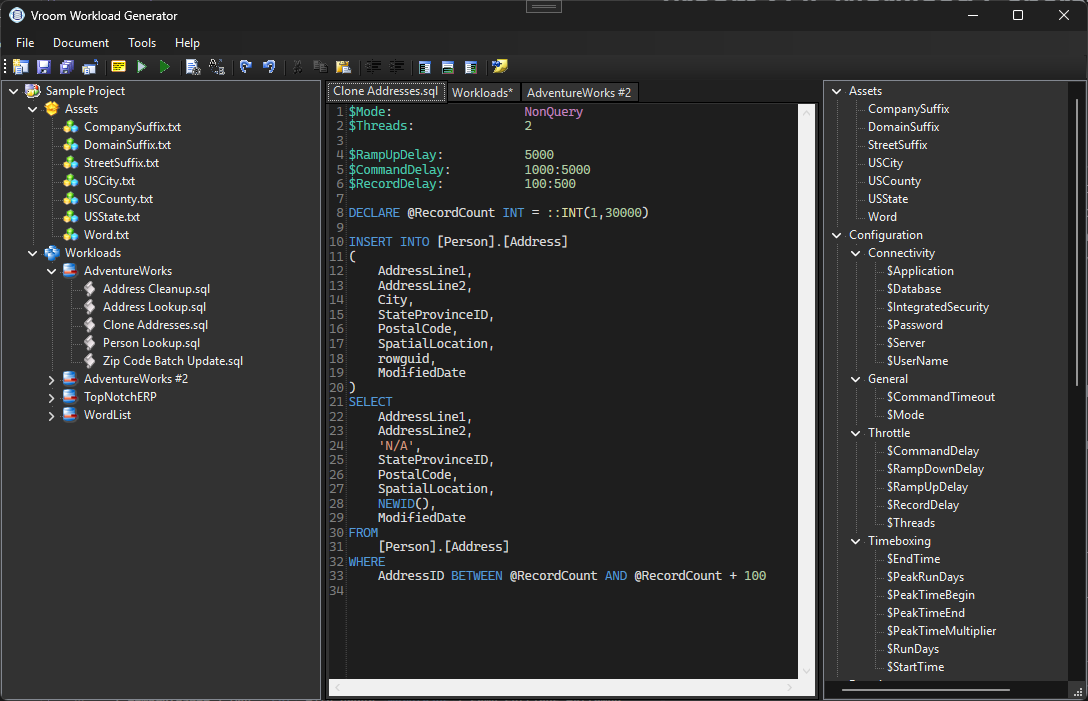
The window has four areas. Each side panel can be hidden with the Toggle buttons on the toolbar.
- Project panel (left). The tree of your project: its
AssetsandWorkloadsfolders and everything in them. Double-click a file to open it in an editor tab. Right-click for a menu:- New Workload (on a workloads folder), New Script (on a workload folder), New Asset, New Note
- Rename, Delete (to the Recycle Bin, after asking)
- Edit on a folder opens its
@Configuration.txt - Refresh, Open containing folder
- Editor (center). One tab per open file, with SQL syntax highlighting, line numbers, and highlighting for settings and functions. An asterisk on a tab means unsaved changes; closing the tab asks first.
- Functions explorer (right). Lists the settings (grouped as Connectivity, General, Throttle and Timeboxing), every function with
its signature, and your project's assets. Hover over an entry for its description. Drag an entry into the editor to insert it:
settings arrive as a ready-to-edit line, functions as an example call, and an asset as a
::DS(...)call. - Output panel (bottom). Opens when there is something to show, with three tabs: Output (messages and errors), Preview (generated SQL) and Results (rows returned by a script you executed).
Toolbar and menus
| Command | Shortcut | What it does |
|---|---|---|
| New Project / Open Existing Project | File menu. Create or open a project. | |
| Save / Save All | Saves the current tab, or every open tab. | |
| Close Current Tab | Closes the tab (asks to save). Document menu also has Close All. | |
| Preview | F6 | Shows the SQL that the current script would send right now, with every function replaced. Nothing is executed. Press it again to see a different random result. |
| Execute Script | F5 | Runs the current script once against the server and shows the rows in the Results tab, with how long it took. |
| Execute Project | Ctrl+F5 | Runs every workload in the project, continuously. Asks you to confirm first. |
| Find / Replace | Ctrl+F / Ctrl+H | Find (F3 for next) and replace in the current tab. |
| Undo, Redo, Cut, Copy, Paste, Indent | Standard editing. | |
| Snippets | Opens a library of ready-made fragments, such as a random person name, phone number or US city, to insert into a script. | |
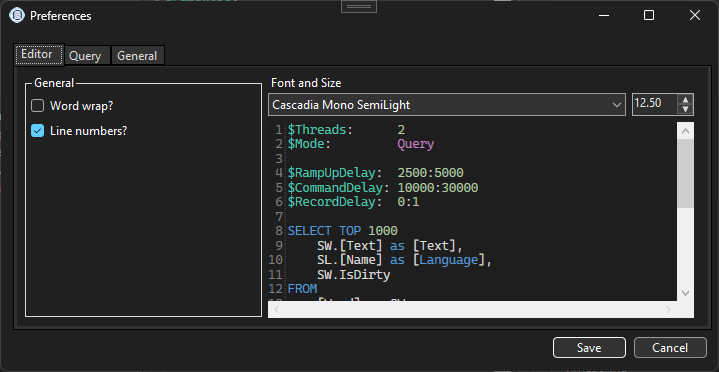
| Preferences | Tools menu: editor font and size, line numbers, word wrap, maximum rows shown, query time-outs. |
Use Preview constantly while you write: it is the quickest way to check that your functions, variables and assets produce the SQL you expect. If something is wrong the error appears in the Output tab with the line it relates to.
The run window
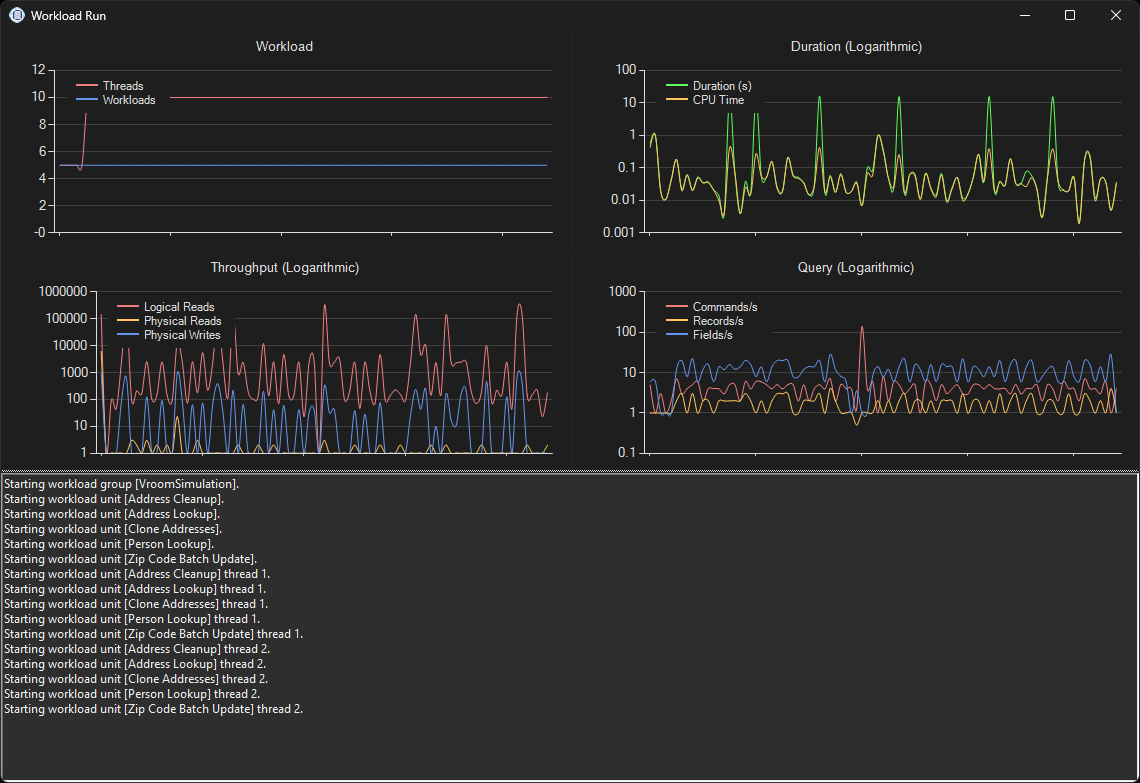
Execute Project opens the run window and starts every workload. Its charts update every second:
| Chart | Shows |
|---|---|
| Workload | Number of running threads and workloads. Watch it climb during ramp-up and fall during ramp-down. |
| Duration | Time that SQL Server reports for the commands, and CPU time. |
| Throughput | Logical reads, physical reads and physical writes. |
| Query | Commands, rows and fields per second. |
The duration, CPU and read figures come from sys.dm_exec_requests for the connection. A login without permission to see them
shows zeros.
The lower pane lists what is happening: each workload and thread starting, and every error (a failed login, a time-out, a syntax error, a deadlock) with the file it came from.
To stop, close the window and answer Yes. The workload ramps down (see Starting and stopping). If it is ramping down slowly and you want it over, close the window again and answer Yes to stop right now.
Settings and how they are inherited
A setting is a line name: value that starts with $:
$Threads:      4
$CommandDelay: 500:2000    -- a comment after a setting is fine
Setting names are not case sensitive, and a setting line may be indented.
Inheritance
A workload does not need to repeat every setting. Its settings are collected from several places and combined, and where the same setting appears more than once, the one that is closest to the script wins.
For a script at Workloads\Orders\Daily\Create Order.sql, the sources are read in this order, outermost first:
Workloads\@Configuration.txt: shared by every workload in the projectWorkloads\Orders\@Configuration.txt: shared by the workloads inOrdersand belowWorkloads\Orders\Daily\@Configuration.txt: shared by the workloads inDailyCreate Order.sqlitself: the script has the last word
Each level only needs the settings it wants to change. A common arrangement:
Workloads\@Configuration.txt            Server, database, credentials, run days, peak times
Workloads\Orders\@Configuration.txt     $Threads: 4     $CommandDelay: 1000:5000
Workloads\Orders\Lookup Order.sql       $CommandDelay: 100:500      (this one runs faster than the others in Orders)
Here Lookup Order.sql uses the server and credentials from the top level, four threads from its folder, and its own command delay.
Change the server in one place and every workload follows.
Notes:
- A folder that has no
@Configuration.txtis simply skipped. - In the project tree, choose Edit on a folder to open its
@Configuration.txt. - A setting that is not recognised (for example a typo such as
$Treads) is reported as an error, and that workload is skipped while the others run.
Ranges
Some settings accept a range min:max. A random value from the range (both ends included) is picked every time it is used, so
$CommandDelay: 500:2000 waits a different time after every command. A single number is fixed.
All settings
| Setting | Default | Meaning |
|---|---|---|
$Server |
(local) |
Server to connect to. |
$Database |
master |
Database to use. |
$Application |
Vroom Workload Generator |
Application name SQL Server sees for the connection. Handy for filtering in monitoring tools. |
$IntegratedSecurity |
True |
True for Windows authentication. False to use $UserName and $Password. |
$UserName, $Password |
empty | SQL Server login, when $IntegratedSecurity is False. |
$Mode |
Query |
Query runs the statement and reads every row it returns. NonQuery runs it and ignores the results (for inserts, updates, deletes). |
$Threads |
1 |
How many threads run this workload. |
$RampUpDelay |
5000 |
Milliseconds between starting each thread when the workload starts. Range allowed. |
$RampDownDelay |
0 |
Milliseconds between stopping each thread when the workload stops. 0 stops them all at once. Range allowed. |
$CommandDelay |
100 |
Milliseconds each thread waits between executions. Range allowed. |
$RecordDelay |
1:5 |
Milliseconds to wait after each row is read in Query mode, which simulates an application processing the rows. Range allowed. |
$CommandTimeout |
30 |
Seconds before a command is cancelled. 0 is no limit. Range allowed. |
$RunDays |
every day | Days the workload runs, for example MON,TUE,WED,THU,FRI. |
$StartTime |
12:00AM |
Time of day the workload may start running, for example 6AM. |
$EndTime |
11:59PM |
Time of day the workload stops running, for example 8PM. If it is earlier than the start, the window runs overnight (10PM to 6AM). |
$PeakRunDays |
MON-FRI |
Days that the peak time applies to. |
$PeakTimeBegin, $PeakTimeEnd |
none | The peak period, for example 9AM to 5PM. May run past midnight. |
$PeakTimeMultiplier |
10 |
0 to 100. The percentage of $CommandDelay removed at the very middle of the peak period. |
Values other than ranges can also contain functions, but they are worked out once when the project is loaded.
Time of day and peak time
Outside its run days and its start/end window a workload's threads stay connected to nothing and simply wait; they resume when the window opens.
Within a peak period, threads speed up gradually: the delay between commands shrinks from normal at $PeakTimeBegin, to its shortest
at the middle of the period, and back to normal at $PeakTimeEnd. At the middle the delay is reduced by $PeakTimeMultiplier percent.
With $CommandDelay: 1000 and $PeakTimeMultiplier: 50, the delay is 1000 ms outside the peak, 750 ms a quarter of the way in, and
500 ms in the middle. This gives a daily curve of load rather than a flat line.
Functions
A function call is written ::Name(arguments), or just ::Name when there are no arguments, and can be placed anywhere in the SQL:
SELECT * FROM Customer WHERE CustomerId = ::Int(1, 50000)
- Function names are not case sensitive.
- Arguments are separated by commas. Write text in double quotes:
::PadLeft("42", 5, "0"). Numbers need no quotes. - To put a double quote or a backslash inside quoted text, write
\"or\\. - Arguments can be other functions:
::Left(::DS("Word"), 1). - A
::that follows a name is T-SQL, not a function (for examplegeography::Point(...)), and is left alone. - You do not need to type these by hand: drag them from the Functions explorer.
Random values
| Function | Result |
|---|---|
::Int(min, max) |
A random whole number from min to max, both included. ::Int(1, 6) is 1 to 6. |
::Decimal(min, max) |
A random decimal number from min up to max. |
::Guid |
A new GUID such as 3f2504e0-4f89-11d3-9a0c-0305e82c3301. |
::RandomAlpha(length) |
Random letters, a-z and A-Z. |
::RandomString(length, allowedCharacters) |
Random text from the characters you allow. Without the second argument, letters, digits and !@$?_-. |
::DS("asset") or ::DataSample("asset") |
A random line from an asset file. See Asset files. |
Dates and times
| Function | Result |
|---|---|
::Date(format) |
The current date. Default format yyyy-MM-dd. |
::Time(format) |
The current time. Default format HH:mm:ss. |
The format is a standard .NET format, so ::Date("MM/dd/yyyy") gives 11/13/2026 and ::Date("yyyy-MM-dd HH:mm:ss") gives both. Dates always
use the same layout regardless of the computer's regional settings.
Reading from the database
| Function | Result |
|---|---|
::SQL("statement") |
Runs a statement and returns the first column of its first row. |
::Scalar("expression") |
Runs SELECT expression and returns the value, for example ::Scalar("GETDATE()"). |
Use these to pick real values that exist, so that lookups find rows:
SELECT * FROM SalesOrder
WHERE CustomerId = ::SQL("SELECT TOP 1 CustomerId FROM Customer ORDER BY NEWID()")
These run as a separate query with their own connection each time the script runs, so they add load of their own.
Text
| Function | Result |
|---|---|
::Left(text, length) |
The first length characters. |
::Right(text, length) |
The last length characters. |
::SubString(text, startIndex, length) |
Part of the text, starting at a zero-based position. |
::Length(text) |
The number of characters. |
::PadLeft(text, totalWidth, paddingCharacter) |
Pads on the left, to totalWidth. The padding defaults to a space. |
::PadRight(text, totalWidth, paddingCharacter) |
Pads on the right. |
::ToUpper(text), ::ToLower(text), ::ToTitleCase(text) |
Changes the case. |
::Left, ::Right and ::SubString never fail on short text; they return what is there.
Hashing and encoding
| Function | Result |
|---|---|
::SHA1(text), ::SHA256(text) |
The hash as upper-case hexadecimal. |
::URLEncode(text), ::URLDecode(text) |
URL-encodes or decodes the text. |
Environment
| Function | Result |
|---|---|
::MachineName |
The name of the computer running the generator. |
::UserName |
The Windows user running the generator. |
::TickCount |
Milliseconds since the computer started. |
Variables and control
| Function | Result |
|---|---|
::Set("name", "value") |
Stores a value. See Variables. |
::Get("name") |
Reads a stored value. |
::Sleep(milliseconds) |
Pauses this thread, for example between two steps of a script. |
::Write("text", "color") |
Shows text in the Output window. Useful for debugging. The color is optional, for example "Green". |
Variables
Sometimes the same random value must appear in more than one place, such as a customer used in several statements. Store it with
::Set and read it with ::Get:
::Set("CustomerId", ::Int(1, 50000))
::Set("Name", ::DS("Word"))

SELECT * FROM Customer     WHERE CustomerId = ::Get("CustomerId")
SELECT * FROM SalesOrder   WHERE CustomerId = ::Get("CustomerId")
UPDATE Customer SET Note = '::Get("Name")' WHERE CustomerId = ::Get("CustomerId")
- Every thread has its own variables. Two threads running the same script never see each other's values.
- Variables start empty every time the script runs, so one execution never leaks into the next.
- Names are not case sensitive.
::Getof a name that was never set returns nothing (empty text). - A line that contains only
::Set,::Writeor::Sleepleaves no blank line behind in the SQL. - Variables exist only inside the script that sets them. They are not shared between workloads.
A value that was set in one place is read in the order the script is written, so set a variable before the line that uses it.
Asset files and ::DS()
Assets are lists of sample values. They let a workload use realistic words, names, cities and codes instead of only random numbers.
Creating an asset
In the project tree, right-click the Assets folder and choose New Asset, or just add a
.txtfile to theAssetsfolder.Put one value per line:
Seattle
Portland
San Francisco
Boise
Save it. The name of the asset is the file name without
.txt:USCity.txtis the asset USCity.
Using an asset
Call ::DS() (short for ::DataSample()) with the asset name. Each time the script runs, it is replaced with a random line from that file:
SELECT * FROM Customer WHERE City = '::DS("USCity")'
This might send WHERE City = 'Boise' one time, and WHERE City = 'Seattle' the next. Every line is equally likely, and any line,
including the last, can be picked. Used twice in one statement, it picks twice, independently:
SELECT * FROM Address
WHERE City = '::DS("USCity")' OR City = '::DS("USCity")'
Use ::Set if you want the same pick in two places.
Because ::DS() only substitutes the text, you control the quoting. Put the quotes in your SQL when the value is text ('::DS("Word")')
and leave them off when it is a number.
Rules
- Asset names are not case sensitive:
::DS("uscity")findsUSCity.txt. - Blank lines are ignored, and spaces at the start and end of a line are trimmed.
- Assets can be kept in subfolders of
Assets. The folder does not matter, only the file name, so two files with the same name in different subfolders clash. The first is used and a warning is shown. - A name that does not match any asset, or an asset with no lines, is an error for that workload.
- Assets are read when the project loads. After editing an asset, press Preview (F6) (which reloads the project), or run the project again.
- The Functions explorer lists your assets. Drag one into the editor to insert the call.
- Values containing an apostrophe (
O'Brien) would end a quoted SQL string early, so keep apostrophes out of assets used inside quotes, or write them doubled (O''Brien) in the file.
Combining assets with other functions
-- Names starting with the first letter of a random word, and a random word in upper case:
SELECT * FROM Person WHERE LastName LIKE '::Left(::DS("Word"), 1)%'
SELECT '::ToUpper(::DS("Word"))'
The sample project's Assets folder (Word, USCity, USState, USCounty, StreetSuffix, CompanySuffix, DomainSuffix) shows the format.
Starting and stopping a workload
Ramp up. When you start a project, each workload starts its threads one at a time, waiting $RampUpDelay between them. The first
thread starts immediately. Ramping up gradually lets the server settle and shows how it behaves as load grows.
$Threads: 10 with $RampUpDelay: 30000 takes about 4.5 minutes to reach full load. Because workloads ramp independently, a project
with several workloads climbs in several steps at once.
Running. Each thread repeats until stopped: build the statement (replacing the functions), connect, execute, read the rows (in Query
mode), then wait $CommandDelay.
Ramp down. When you stop, threads stop one at a time, the last started first, waiting $RampDownDelay between them. The default,
0, stops them all at once. A thread finishes the command it is running before it stops, so stopping is clean rather than abrupt.
Stopping while a workload is still ramping up cancels the threads that have not yet started.
Stop immediately. If a ramp-down is taking too long, you can skip it: close the run window a second time in the app, or press a key a second time in the console application. This cancels the commands that are executing.
When something fails. If a connection cannot be made or a statement fails, the error is reported and the thread waits at least a second before trying again, so a down server is not hammered. A workload that fails to load is skipped; the rest still run.
Running from the console
A project can be run without the desktop app, from a command prompt, a scheduled task or a script, using VSWG.CmdLine.exe, installed next to the app:
VSWG.CmdLine.exe "C:\Projects\MyProject\MyProject.vwgp"
The workloads start (ramping up as configured) and a status line is refreshed every second:
Threads: 12 => Per/s[Cmds: 148.20, Rows: 2310.50, Fields: 11552.00]
Messages about threads starting and stopping, and every error, are printed as they happen, each with the script file it came from.
To stop:
| Action | Result |
|---|---|
| Press any key, or Ctrl+C, once | Ramps down gracefully (honouring $RampDownDelay), then exits. |
| Press again | Stops right now and cancels commands that are running. |
Exit code: 0 after a normal run, 1 if no project was given, 2 if the project could not be loaded (for example a missing
Workloads folder).
The console application uses exactly the same project files, settings, functions and assets as the desktop app, so build and test a
project in the app with Preview and Execute Script, then run it unattended with the console application. Because it runs
until stopped, schedule it with the $StartTime, $EndTime and $RunDays settings of the workloads, or have your scheduler end the process.
Tips for unattended runs:
- Use
$IntegratedSecurity: Truewhere you can. If you must store a SQL login, remember that$Passwordis saved in plain text in the project file. - Set
$Applicationto something recognisable so you can find the load in SQL Server's activity monitoring. - Run the console application on a different machine from the server so that it does not compete for CPU with what you are measuring.
The desktop app can also be started on a project directly: VSWG.UI.exe open "MyProject.vwgp" opens it for editing, and
VSWG.UI.exe run "MyProject.vwgp" opens the run window and starts it immediately. The installer registers the .vwgp extension so you can right-click a project
file and choose Open, Execute in UI or Execute in Console.
A complete example
Workloads\@Configuration.txt, shared by everything:
$Server:             SQLTEST01
$Database:           Sales
$Application:        Load Test
$IntegratedSecurity: True

$RunDays:            MON,TUE,WED,THU,FRI
$StartTime:          7AM
$EndTime:            7PM
$PeakTimeBegin:      10AM
$PeakTimeEnd:        2PM
$PeakTimeMultiplier: 60
Workloads\Orders\@Configuration.txt, for the order workloads:
$Threads:        6
$RampUpDelay:    10000
$RampDownDelay:  2000
$CommandDelay:   1000:4000
Workloads\Orders\Create Order.sql:
$Mode: NonQuery
$Threads: 2                                 -- overrides the 6 from the folder

::Set("Customer", ::Int(1, 50000))
::Set("Qty", ::Int(1, 20))

INSERT INTO SalesOrder (CustomerId, Qty, ShipCity, CreatedOn, Reference)
VALUES (::Get("Customer"), ::Get("Qty"), '::DS("USCity")', '::Date("yyyy-MM-dd HH:mm:ss")', '::RandomString(8, "ABCDEFG0123456789")')
Workloads\Orders\Lookup Order.sql:
$Mode: Query
$CommandDelay: 200:800                      -- reads happen more often than writes

SELECT TOP 50 *
FROM SalesOrder
WHERE CustomerId = ::Int(1, 50000)
  AND ShipCity = '::DS("USCity")'
ORDER BY CreatedOn DESC
Assets\USCity.txt:
Seattle
Portland
Boise
Spokane
Run this and you get: two threads inserting orders and six threads looking them up (the folder's $Threads: 6), against SQLTEST01,
weekdays 7 AM to 7 PM, with the load rising to a peak around noon, and threads starting 10 seconds apart and stopping 2 seconds apart.
Troubleshooting
| Symptom | What to check |
|---|---|
Unknown configuration element: [...] |
A line starting with $ is not a setting name. Check the spelling against All settings. |
Failed to parse value for [...] |
The value is the wrong type, for example $Threads: many. The message names the line. |
Unknown function 'X' |
The function name after :: is misspelled. Use the Functions explorer. |
Asset X is not defined |
There is no X.txt in the Assets folder, or the project was not reloaded after you added it. |
| A workload does not run | Check its $RunDays, $StartTime and $EndTime; outside them it waits. Also check the Output tab for a configuration error. |
| Charts show 1 for duration, CPU and reads | The login lacks permission to read sys.dm_exec_requests, or nothing has run yet. |
| Login failed / server not found | Check $Server, $Database and credentials. The error repeats about once a second per thread. |
| A function appears unchanged in the SQL | It was not recognised as a function. A function is ::Name(...) with no space before the :: after a letter or digit. |
Preview shows what you expect but Execute Script fails |
The SQL itself has an error. The message from SQL Server is in the Output tab. |